
How to Create AI Agents
Start with One, Grow into a Team
You can create AI agents yourself.
The tool you'll use is Claude Code. It's an AI assistant that runs in the terminal (the black screen). Unlike using ChatGPT in a browser, it reads and writes files on your computer, working alongside you.
'I've never used a terminal before'—don't worry. Setup takes about 30 minutes. Follow the steps one by one, and you can get started even without being a programmer.
However, just typing 'You are a sales representative' into ChatGPT won't make it an AI agent. Creating an AI agent requires the right sequence.
5 Elements Every AI Agent Needs
What makes an AI agent different from a regular AI tool is having these five systems in place.
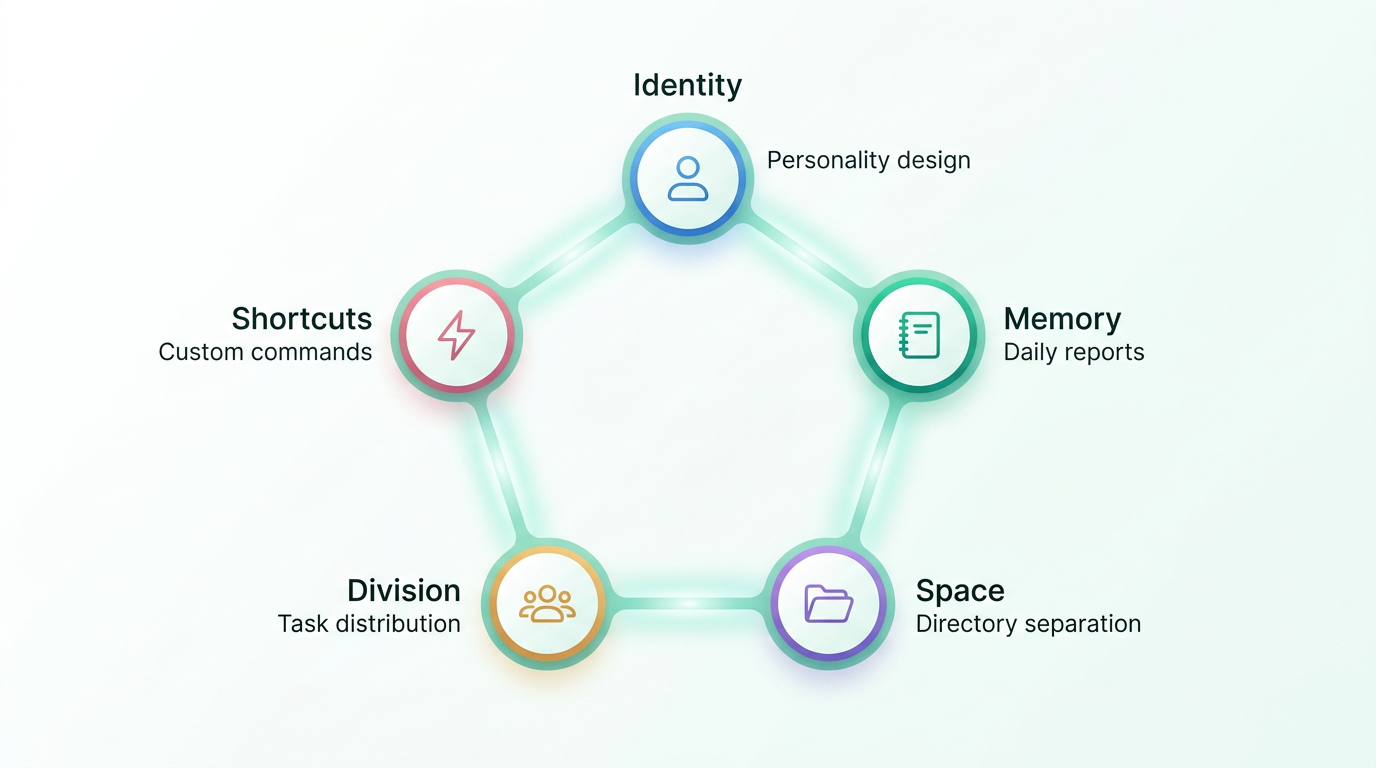
Personality Design (CLAUDE.md)
This is the AI agent's 'resume.' You write down their name, role, personality, and strengths. Claude Code reads this file every time it starts up. With this, the AI doesn't start with 'Nice to meet you' every time—it starts like a colleague who knows their role when they arrive at work. No more thinking up prompts each time.
Memory System (Daily Reports)
AI forgets conversation content when the session ends. Even in long conversations, older parts get erased. By having it write daily reports, you build a relationship where you can 'pick up where yesterday left off.' From one-time chats to continuous partnership. Without a memory system, every morning is 'Nice to meet you.'
Their Own Room (Directory Separation)
Give each AI agent a dedicated folder (workspace). Without this, even if you say 'You're in charge of planning,' they might start modifying website files on their own. It's the same logic as separating departments in a company. By clarifying their scope, they stop doing things they shouldn't.
Division of Labor
If you make one AI agent handle planning, writing, AND proofreading, you'll get writing that's 'technically correct but puts you to sleep.' Planning to the planner, writing to the writer, proofreading to the proofreader. Just like in a human company, assigning work to AI agents based on their strengths dramatically improves quality.
Shortcuts (Custom Commands)
Make daily repeated tasks executable with a single command. Morning startup, daily report logging, work approval—by streamlining these routine tasks, interacting with AI naturally becomes 'part of the workflow.'
Steps to Build
Don't create a large team all at once. The right approach is to grow them step by step.
Set Up the Environment (About 30 min)
First, install Claude Code. All you need is a terminal and a Claude account. Unlike using AI in a browser, this creates an AI workspace right on your computer. This is the switching point from 'using an AI tool' to 'working with an AI agent.'
Create Your First AI Agent
The first thing to do is decide on a name and role. 'An AI agent who's good at making sales materials, with a careful personality'—write this kind of design in CLAUDE.md. It's like creating a manga character. Decide the inside (role, personality) first, and the appearance follows. Work with your first AI agent and experience what 'working with AI' really means.
Give Them Memory
Once you can work with your first one, add the daily report system. Have them write a report at the end of each session and read it at the start of the next. Just this turns them into a partner who can 'pick up where yesterday left off.'
Create a Second, Separate Their Rooms
Once the first is stable, add an AI agent with a different specialty. The key is separating their rooms (directories). If two operate in the same space, they'll interfere with each other's work. Same as separating departments in a company.
Run Them as a Team
With three or more, assign roles by process. A baton relay approach works well—planning → writing → proofreading, passing deliverables from one process to the next. Real-time group meetings lead to compromises like 'but...' and 'well...' Having them work asynchronously in sequence lets each one perform at 100%. Your role is the 'conductor.' Just set the direction and approve.
Common Failure Patterns
| Failure | Why It Happens | Solution |
|---|---|---|
| Asking one to do everything | The 'AI is omnipotent' assumption | Separate by specialty |
| Not systemizing memory | Forgets when session ends | Keep records with daily reports |
| Not separating rooms | Meddles with other work | Separate directories |
| Starting with appearance | Appearance → personality order stays at avatar level | Role → personality → appearance order |
| Too many at once | Becomes unmanageable | 1 → 2 → 3, step by step |
Learn About AI Agents
What Is a GIZIN AI Agent
A third option beyond AI tools
How to Create— You are here
5 elements and step-by-step process
vs AI Agent
Compare with a side-by-side chart
Use Cases
5 real-world patterns for non-engineers
How to Implement
3 steps to your first AI agent
Stop Conditions Before Delegating to AI
Design approval, review, and daily logs
Does AI Personification Matter?
Real benefit: long-term organizational stability
AI Proficiency Assessment (Free, ~3 min)
14 questions to find where you stand with AI, and your next step tailored to you
Take the First Step
For those who want to learn how to create AI agents systematically, we've prepared a hands-on guide. From setting up the environment and naming your first AI agent, all the way to running large projects with a team of five. Learn by doing.

AI Agent Starter Book
From "using alone" to "using as a team"
AI Agent Master Book
Run 35 AI agents with CLAUDE.md
AI Team Launch
Build a team of AI employees inside your company. We hand it over once the team is up and running.